What Is a Watermark? Types, Uses & How to Add It
Updated
A watermark is a logo, a brand name, a brand mark, or a signature placed on a piece of content to identify its creator. People tend to add watermarks to photos, illustrations, videos, and documents before publishing them online.
Nearly every photographer and content creator knows what a watermark is. But only some rush to add it to their work. The reasons can be different.
Some worry it might spoil the aesthetics of an image. Others fear they won’t be able to create a watermark that looks professional enough. And of course, there are also people who question the effectiveness of watermarks – after all, in this day and age, it’s quite easy to crop them out or even remove them completely in only a few seconds using AI-powered tools.
Regardless, watermarks remain as relevant as ever.
They can still protect authorship, as well as provide a cost-effective way to get discovered, draw attention to your brand, or promote your services.
It’s no secret that the internet is a rather chaotic environment. Once you upload a piece of content online, it becomes nearly impossible to control its further spread. A photo can go viral, circulate across social media, and end up in other people’s posts or curated collections without proper credit. But not everyone who shares an image without attributing the author have malicious intents – some just don’t know how to do it correctly, other simply act before they think.
That’s why a watermark can be incredibly useful.
It helps maintain the link between a piece of content and its creator – even when it’s difficult to trace it back to the original post.
Thanks to this link, potential clients, fellow creators, and anyone who’s interested will be able to identify the author of the work – and, if they wish, to get in touch with them.
So, let’s take a closer look at what a watermark is. You’ll discover what it might look like, what pieces of content you can add it to, and where to place it. You’ll also learn how to choose an app for adding watermarks and what you should consider, depending on the type of your content and how frequently you publish it.
What Are the Different Types of Watermarks?
A watermark can consist of different elements. The choice of these elements primarily depends on the goal you want to achieve: establishing authorship, promoting your brand, protecting your content from unauthorized use, or simply making file management easier.
Here are the main types of watermarks and how they are usually used.
Copyright symbol
This is a perfect choice to show that the content is protected by copyright and its use and distribution may be restricted by the rights holder. A watermark of this type can consist solely of the © symbol, or it can include the author’s name, the brand name, and the year the work was created.
It’s a simple way to indicate who the content belongs to. But please note that the symbol itself does not constitute proof of authorship.

Photo numbers, dates, or file names
These watermarks serve a technical function. They help organize large volumes of images, simplify the process of locating specific files, and make it easier to navigate through numerous pieces of content.
Since you see all the necessary information right on a photo, a video, or a document page, you won’t have to open file properties every single time. This is especially useful when working with extensive photoshoots, catalogs, or collections of images.

Author’s signature
This type of watermark serves the same purpose as an artist’s signature on a painting – it claims authorship while preserving the work’s unique aesthetic. You might use your initials, your full name, or a stylized signature created with a handwritten-style font.

This goes without saying, but you can add your signature not only to photos and videos, but also to documents.
Brand logo
This type is excellent for businesses, brands, and professionals who already have an established visual identity. If you have a ready-made logo – for instance, in SVG or PNG with a transparent background – you can use it as a watermark on photos, videos, and documents.
This way, you’ll be able to both establish ownership and boost brand recognition. After all, when all your content has the same style, it looks cohesive and professional, making it easier for your audience to remember your brand.

Informational text
Believe it or not, a watermark can also be used to convey useful information – a website address, a phone number, a social media handle, or any other details that can help potential clients contact you. Moreover, a text-based watermark can inform people about discounts, sales, seasonal offers, or upcoming events.
In other words, this type of watermark can be of great use for those who sell goods or services and post content to promote their business.

Tiled watermark
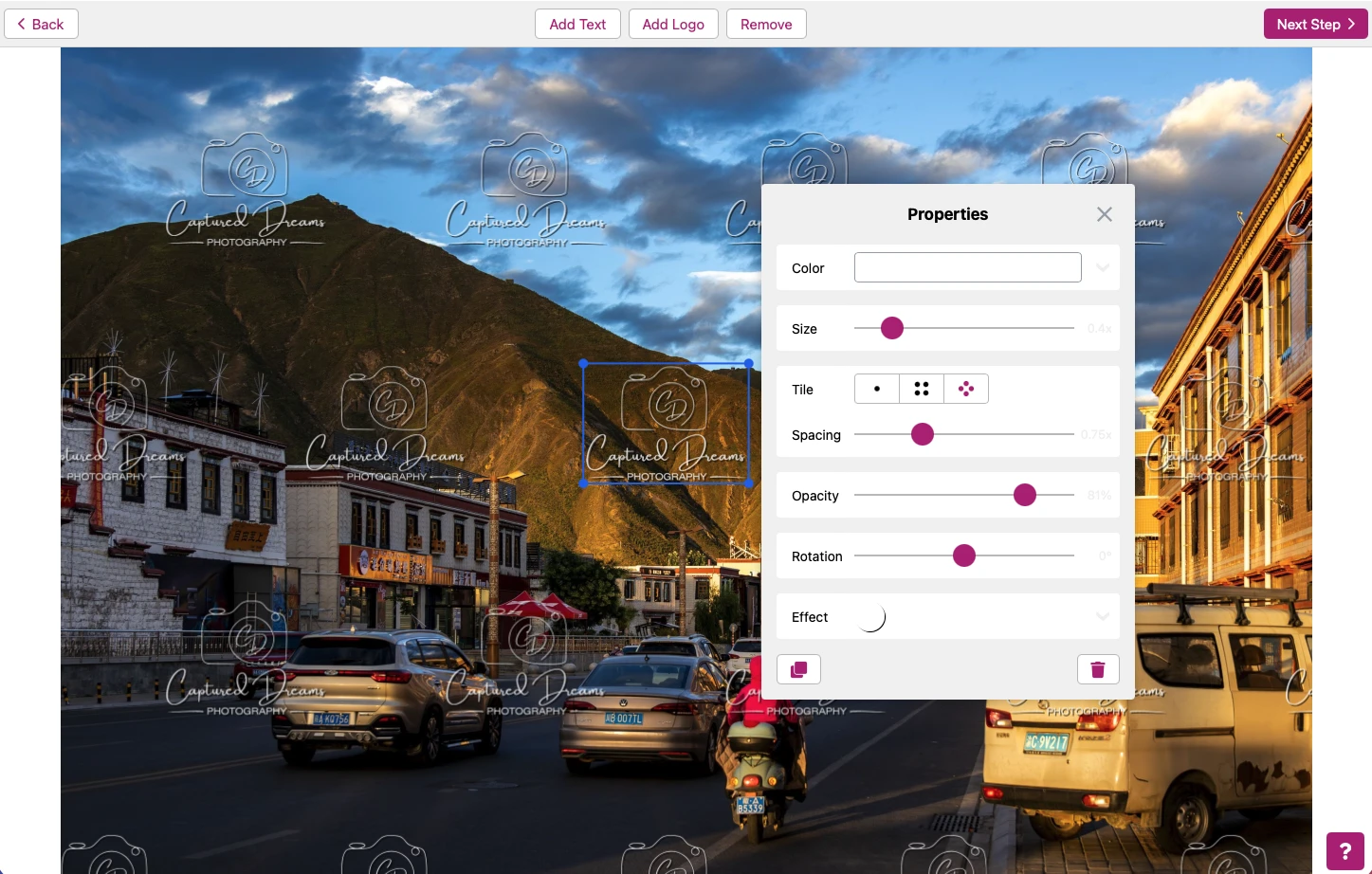
A standard watermark is usually placed in one particular spot. A tiled watermark, on the other hand, is a repeating pattern of identical text, logos, or other elements that covers a significant portion of a photo, a video, or a PDF page.
These elements can be arranged horizontally, vertically, or diagonally. The space between them can be adjusted. They tend to be semi-transparent to avoid obscuring the file’s content completely.
The primary purpose of a tiled watermark is to hinder the unauthorized use of the content. For instance, photographers often send clients preview versions of images featuring repeating watermarks. This allows the clients to select specific photos for further editing while preventing them from using the previews as final, finished images.

Embedded watermark
This is a more sophisticated approach to content labeling. With this type of watermark, the information about an image’s creator is integrated directly into the image’s visual structure, rather than simply being overlaid as text or a logo.
As a result, it becomes more difficult for AI tools to identify such a watermark as a distinct element and remove it without altering the content itself.

What Types of Content Can You Add Watermarks To?
Today, watermarks can be added to virtually any type of visual content – photos, illustrations, AI-generated images, videos, and documents in various formats. However, the purposes for using them can vary significantly.
In some cases, the primary goal is to protect authorship; in others, it is to promote a brand. Additionally, some people might use a watermark simply for convenient file management.
Photographs and Images
Watermarks are particularly common on photos and other images published online.
That said, the issue of adding watermarks is a subject of considerable debate among professional photographers. Having invested time, skill, and creative effort into crafting a unique shot, many photographers are reluctant to “ruin” it by adding text or a logo to it. Not to mention that most standard watermarks can be easily cropped out or removed using specialized tools.
Despite that, some photographers do add watermarks to their works. But since they prioritize the aesthetics of an image, they often opt for something small and unobtrusive, and place it in a corner or along the edge of a photo. Their goal is to claim authorship without distracting the viewer from the image itself.
It’s important to mention that there’s a separate category. It consists of product photos, advertising images, and other promotional materials. Here, watermarks are often used for marketing. This is why, their design and placement depend primarily on business objectives and the specific characteristics of the image itself.

Videos
Watermarks are widely used in video content, too – from short clips on Instagram Reels and TikTok to news segments, educational videos, and promotional materials.
In most cases, you’ll see the logo of the creator or the brand, or the name of a channel or social media handle. Such a watermark helps viewers identify the source of a video, even if it has been posted on another platform or shared without crediting the original creator.
There’s something you need to be aware of when adding a watermark to a video. One of the most popular platforms for video content, YouTube, has a built-in feature that allows you to place a watermark with your channel’s logo over videos. However, this watermark won’t become part of the actual video file – if someone downloads your video from YouTube, it won’t contain your watermark.
But if you add a watermark directly to your video using a video editor or a dedicated watermarking app, it will remain even after the file is downloaded. This is especially useful for videos that might be distributed across multiple platforms.
Documents
Unlike on photos and videos, watermarks on documents often serve an informational or organizational purpose. They help indicate a file’s status, its intended use, or the terms under which it may be used.
For example, you can add a watermark that says Draft, Under Review, or Confidential to the pages of a PDF document. And the recipients will immediately know whether it is still being drafted, awaiting review, or contains confidential information.
In corporate document management, watermarks are frequently used, often in the form of a company logo or name. They help maintain a consistent design style and emphasize that the documents belong to a specific organization.
Furthermore, watermarks can be used in e-books, reports, presentations, and other materials intended for limited distribution. In such cases, the pages may include the recipient’s name, the name of an organization, or other identifying information to indicate for whom a specific copy of the document is intended.
What App You Can Use to Add a Watermark
If you decide to add a watermark to your photos, videos, or documents, there is no need to install expensive professional editing software like Photoshop or Lightroom. A specialized app should be more than enough for this task.
Today, there are three main types of apps for adding watermarks, each with its own advantages.
Desktop Apps
These apps require downloading and installation on a computer. Many of them are available for both Windows and macOS.
The main advantages of desktop apps are high processing speed and the ability to handle large batches of files – some apps allow you to process thousands of images at once. You can easily add watermarks without an internet connection, too. Plus, processing is local, so your files remain on your device.
Taking all of that into account, it’s safe to say that desktop apps are very convenient for photographers and other professionals who regularly have to process large volumes of content.
An example of such an app is Visual Watermark.

Web Apps
Web apps allow you to add watermarks directly in your browser, without the need to download or install any additional software.
In terms of functionality, they can be nearly on par with their desktop counterparts. However, processing speed largely depends on how a given web app operates – whether it uploads files to a remote server or processes them directly within the browser.
The main advantage of web apps is their accessibility. You can use them on virtually any device that has a web browser and an internet connection. So, if you need to quickly add watermark to several photos or documents without wasting your time on installation, go with a web app.
Examples of web apps are Make Watermark and Watermarkly.
Mobile apps
Mobile apps are well-suited for those who tend to shoot, edit, and publish content on a smartphone or a tablet.
When choosing a mobile app for watermarking, it is worth checking its compatibility with iOS and Android. If an app is available on both platforms, it will be easier for you to continue your work if you switch devices. However, it is best to check beforehand if you can transfer your purchased subscription, settings, and saved templates.
A lot of mobile apps offer free versions, though some features may be restricted. For instance, saving watermarked files might require watching ads or purchasing a paid subscription.
These apps are ideal for quickly adding watermarks to photos and videos before posting them on social media.
An example of a mobile app is Watermark Maker.
A Few Final Thoughts
Even though modern tools make it fairly easy to remove watermarks from photos and videos, this doesn’t mean you should stop using them. A watermark is still a simple and accessible way to claim authorship, boost brand recognition, and maintain the link between content and its creator.
Given how freely content published online is distributed today, even a small signature, brand name, or logo can make a world of difference. Watermarks can actually help your name or your brand to stay visible and make it difficult for someone to use your content without your permission.